Gaming tower
The only station whose machine you pick part by part. Here the fast monitor and the audio are half the experience, and no dock or stand is worth anything.
Lo que hace falta
sin total
1 of 2 parts have no price in this store, so no total is shown: an incomplete one reads like a bargain.
Lo que se disfruta
sin total
5 of 12 parts have no price in this store, so no total is shown: an incomplete one reads like a bargain.
As an Amazon Associate I earn from qualifying purchases. Put plainly: if you buy, I earn a commission and it costs you nothing extra. How it works
The monitor
 lo que se disfruta$209 USD
ASUS TUF VG27AQ3A, 27 inches at 1440p and 180 Hz
 lo que se disfruta$200 USD
BenQ EW270Q, 27 inches at 1440p and 200 Hz
The cable
 lo que se disfruta$25 USD
Club 3D DisplayPort 2.1, DP80 certified
The keyboard
 lo que se disfruta$99 USD
Corsair K70 Core, mechanical with onboard memory
The mouse
 lo que se disfruta$79 USD
Glorious Model O wireless, 69 grams
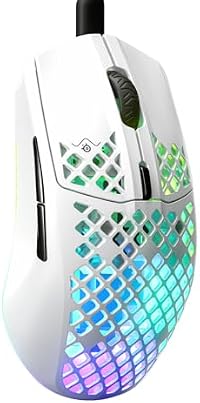 lo que hace falta$60 USD
SteelSeries Aerox 3
Headphones and headsets
 lo que se disfruta$398 USD
Sony WH-1000XM6 — for LISTENING
The speakers

The chair
 lo que hace falta
HON Ignition 2.0, seven-year warranty
 lo que se disfruta
Steelcase Series 1, twelve-year warranty
 lo que se disfruta
Herman Miller Aeron Classic size B, twelve years
The desk
 lo que se disfruta
VIVO, dual-motor electric frame (72.4–120 cm)
The criteria for each family — what to look at and what trap it has — is on the setup page.